Tips & Resources
What Is Omnichannel Customer Support and How to Provide It?

Updated: Published:
More communication channels — more problems? Not quite. Syncing these channels fuels a customer-centric approach. Read on to learn more.


Juliia Serdiuk
Juliia Serdiuk is an Outreach Specialist at HelpCrunch, all-in-one customer service software.
What Is Omnichannel Customer Support and How to Provide It?
Meet Ava Chen, founder of Craftopia, a growing arts & crafts retail chain. As business expanded, Ava noticed an increase in customer complaints—mostly about fragmented experiences between the website, stores, and workshops. A glitch in class registrations even went viral. That’s when Ava explored a solution: omnichannel customer support.
Ava realized these disjointed systems were contrary to the cohesive, inspiring service she aimed to provide. After doing some research, she decided that omnichannel customer support could help.
In this article, we follow Ava on her journey discovering exactly what omnichannel support is all about and highlight how businesses like Craftopia, or many others, can implement it.
Let's start with the essentials.

Free to use image sourced from Unsplash
What is Omnichannel Customer Support (and How It Differs from Multichannel)
Omnichannel customer support is a strategy where businesses synchronize various communication channels to deliver a consistent experience for customers, whether in-store or online.
For example, customers can email you and then seamlessly transition to a phone call with all the context and information intact.
Omnichannel support is vital in the modern business context. What Ava found most impressive about this approach is that it ensures:
Effortless transitions between channels and uniform support, allowing customers to switch contact methods without losing progress or repeating themselves.
Full context for customer service agents, as customer data is shared across channels.

Prior to her research, Ava thought omnichannel was just another term to describe a multichannel approach. But that's not quite right. Let's learn the difference between the two.
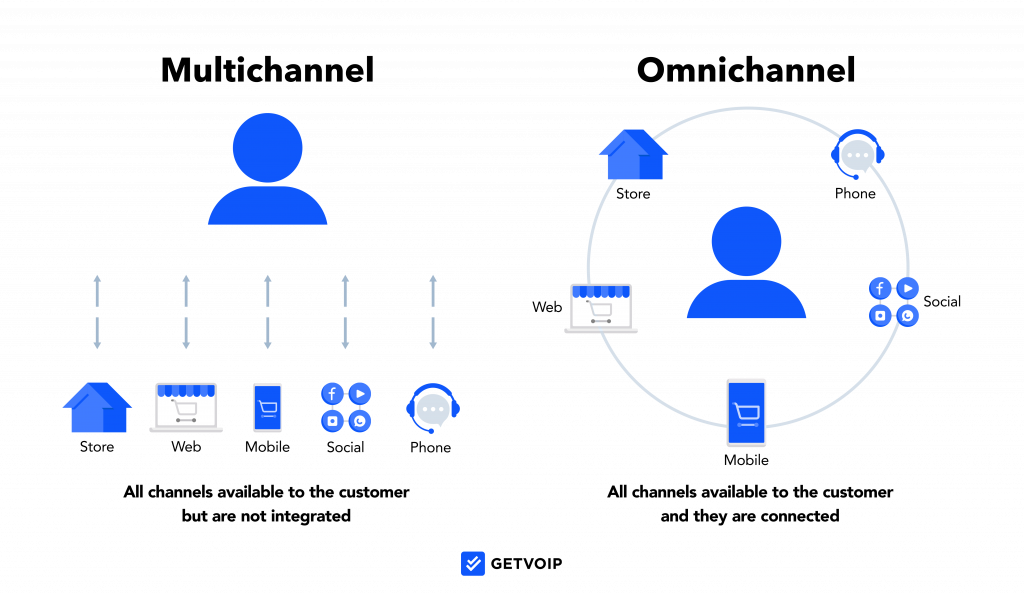
Difference between a multichannel and omnichannel
approach
Here's the breakdown:
In multichannel, various communication channels work independently. This can lead to a fragmented experience where customers have to repeat themselves, which was the case with Craftopia as they provided inconsistent experience between the website and retail stores.
In omnichannel, channels are linked. Thanks to different tools, such as integrated CRMs (like Zendesk alternatives), customer data and history move smoothly across all channels.

With channel mixes becoming more complex, many businesses beyond arts and crafts chains like Craftopia are considering omnichannel. And rightfully so, as the benefits are plentiful.
Case studies and stats that show the benefits of omnichannel
Besides the clear advantage of a quicker response time from synced communication channels, omnichannel offers several other benefits for businesses. To name just a few:
Unified customer profile. A CRM system consolidating data from different channels is handy here. T-Mobile, for instance, uses Salesforce CRM across stores, call centers, and apps, giving agents a 360-degree customer view and reducing order processing time by 70%.
Increased sales opportunities. Deloitte research indicates that customers with high-quality omnichannel experiences are 3.6 times more likely to make additional purchases from the same company. This opens doors for cross-selling and upselling.
Accurate and compliant responses. Wells Fargo uses a unified platform for social media support. This ensures a consistent brand voice to over 70 million clients and helps the bank deliver a compliant and seamless experience at scale.
Broadening audience reach. Adidas integrates Web3 into its omnichannel strategy, creating micro-communities and NFT tokens in the virtual world to engage younger audiences, particularly Gen Z.

These benefits showcase the efficiency of an omnichannel strategy. But before diving into its implementation, let's check if this is the right strategy for your specific business.
Is an omnichannel strategy right for your business?
Use our checklist to figure out if omnichannel customer support is right for you. If you answer 'yes' to any of these questions, omnichannel might be a good fit.
Do your customers engage with you across multiple channels (phone, email, chat, in-person, etc.)?
Do you want to expand channel support to grow engagement?
Are your customers complaining about inconsistent experiences between channels?
Is important context and data getting lost when customers switch channels?
Is there a lack of visibility into customer history and interactions across channels?
Are your customer satisfaction scores inconsistent across service channels?
Craftopia's Ava checks off 5 out of 6 items, how about you?
If any of these questions resonate with your business, it may be time to explore implementing an omnichannel customer service strategy!
Collecting and Utilizing Customer Data
A successful omnichannel customer service strategy starts with collecting and making the most of customer data. Every interaction—whether it’s a quick question on social media platforms, a detailed phone call, or a chat via instant messaging—offers valuable insights into customer preferences, behaviors, and expectations. By gathering this data across multiple channels, businesses can build a comprehensive understanding of each omnichannel customer.
Leveraging customer data allows companies to personalize every touchpoint, ensuring that support agents can anticipate needs and tailor their responses. For example, if a customer frequently reaches out via instant messaging for order updates, your team can proactively provide shipping notifications through their preferred channel. This not only increases customer satisfaction but also boosts agent productivity, as support teams can resolve issues more efficiently with the right context at their fingertips.
Moreover, analyzing patterns in customer interactions helps businesses identify common pain points and develop targeted solutions, giving them a competitive advantage. By using customer data to inform your omnichannel customer service strategy, you can foster customer loyalty, address issues before they escalate, and ultimately drive revenue growth. In today’s fast-paced environment, the ability to turn data into actionable insights is what sets leading brands apart.
Mapping the Customer Journey
Understanding the entire customer journey is at the heart of any effective omnichannel customer service strategy. Mapping the customer journey means identifying every touchpoint where customers interact with your brand—whether it’s browsing your website, engaging on social media, visiting a physical store, or reaching out for support. By visualizing how customers move between different channels, you gain a clear picture of their experiences, preferences, and potential frustrations.
This process allows you to spot gaps and pain points in the support process, such as where customers might encounter delays or inconsistent information. With these insights, you can streamline transitions between channels, ensuring that every omnichannel customer receives a seamless and consistent experience. Journey mapping also highlights opportunities to personalize interactions and deliver proactive support, which can significantly increase customer retention.
By regularly reviewing and updating your customer journey maps, you ensure your omnichannel customer service strategy evolves alongside changing customer behaviors and expectations. Ultimately, mapping the customer journey empowers your team to deliver high-quality support across various channels, making every step of the customer experience as smooth and satisfying as possible.
Empowering Customer Service Agents
Your customer service agents are the frontline of your omnichannel customer experience. Empowering them with the right tools and information is essential for delivering fast, personalized, and effective support across multiple channels. When agents have access to comprehensive customer information—including previous interactions, preferences, and purchase history—they can provide immediate answers and resolve even complex issues with confidence.
Investing in technology like CRM systems and ticketing platforms enables agents to manage customer interactions seamlessly, whether they’re responding to emails, answering phone calls, or engaging on social media. But technology alone isn’t enough. Ongoing training and development ensure your support team stays up-to-date with the latest trends, tools, and best practices in omnichannel customer service.
Empowered agents are more productive, motivated, and capable of delivering the kind of personalized support that leads to improved customer satisfaction and loyalty. By equipping your team to handle inquiries across all channels, you create a consistent and memorable customer experience—one that keeps customers coming back and recommending your brand to others.
Starting your omnichannel strategy: Practical steps and tips
Here are some essential best practices and tips for anyone diving into omnichannel communications. We'll illustrate these with examples from our hypothetical Craftopia and real-life scenarios.
1. Understand your customers' preferred channels
People use many online communication tools, so their preferences can vary. Start by collecting data about your customers and how they like to engage with your brand. For example, explore performance statistics tools to uncover insights into your customers' communication preferences. Or look at some of the following data:
Web traffic analytics
Sales data
Support/contact logs
Social media insights
Mobile app analytics
Take Craftopia's situation, for example. Since they have a strong offline and online presence, they can start by:
Analyzing support tickets from the past year, categorizing them by the channel through which they came in
Reviewing website analytics data to assess traffic volumes to key pages like the store locator, class registration, and product detail pages
With this data on how customers use different channels, it's time to conduct a comprehensive analysis of all existing channels.
2. Evaluate your current channels and touchpoints
The aim here is to get a complete view of how well your existing channels perform and where you can enhance the omnichannel customer service experience. To do this, you can:
Audit existing channels. Make a thorough list of current channels, such as the website, mobile app, email, social media, online chat, in-person stores, and more, even if some are less frequently used by customers.
Analyze usage data. Gather relevant data for each channel, like website visits, email open rates, call volume, and foot traffic, to measure customer usage and engagement.
Review capabilities. Document the key features, functions, and capabilities of each channel in areas like purchases, support, and engagement. For instance, if you focus on phone-based customer support, it can be a great idea to make good use of call tracking
Map customer journeys. Illustrate typical customer journeys across channels to identify any gaps, pain points, or inconsistencies. Create separate customer journey maps for each major touchpoint customers use to get in touch, across all of your channels. Templates can be helpful:

Calculate ROI. Estimate costs versus revenue/value provided by each channel to prioritize and determine the next investments.
Gather feedback. Collect, analyze, and take action on Voice of Customer feedback from all channels.
Now that you've reviewed all your current channels, it's time to choose the high-priority ones.
3. Choose your priority channels
Be strategic. Identify the channels that matter most for you and the ones your customers use (or complain about) the most, and focus on those. It's better to excel in a few channels than to be just okay in many.
One good way to make the right choice is to invest in a data science service to extract valuable insights from your data and implement it in choosing your priority customer support channel.
For example, Craftopia's main problem is the disconnected experiences between two key channels — the website and retail stores. To fix this, they should integrate the website with in-store Point of Sale (POS) and inventory systems. This way, customers can easily check product availability and pricing across both channels.
4. Invest in omnichannel software
Now that you've identified your important channels, let's talk about turning your omnichannel plan into reality. The most effective way to do this is by using omnichannel software.
For Craftopia, something like Shopify's POS (Point of Sale) system could be a great choice. It helps connect online and in-store information, addressing Craftopia's main issue.
However, for online businesses, different solutions covering digital channels might work better. The key is to pick a provider based on what your business needs. Here are a few things to consider:
- Unified channels. For example, Microsoft Dynamics 365 Customer Service lets you connect channels such as messaging including chat, IVR, voice, SMS, social, and Microsoft Teams.

CRM integration to keep track of all customer interactions and data in one place. Examples are Microsoft Dynamics 365 Customer Service, HubSpot CRM, and Zoho.
Customer intelligence tools to collect detailed customer data across channels and use it to personalize engagements. Examples include:
Customer data platforms (CDP) for a unified customer profile, like Adobe Real-Time CDP.
Analytics and engagement hubs to understand customer behavior, like Microsoft's Dynamics 365 Customer Insights.
Customer journey orchestration to analyze and personalize engagements across channels, like Adobe Journey Optimizer.
Pre-built automation for tasks like chatbots, email workflows, and customer onboarding to optimize support processes.
Many omnichannel software providers offer free trials, so you can try them out without risk.
When implementing a solution, keep an eye on key omnichannel metrics to understand your overall performance.
If your customer journey involves appointment scheduling—like retail consultations, workshops, or in-branch services—tools like TIMIFY can enhance your omnichannel setup. With features like cross-channel booking, real-time staff assignment, and seamless reminder syncing, TIMIFY bridges online and offline interactions while keeping your brand experience consistent.
5. Consider setting up a knowledge base
Last but not least, a knowledge base is crucial for omnichannel support. It's like an organized library of information that helps both employees and customers with:
Unified information. A central knowledge base is the go-to source for customer service reps across all channels like email, chat, phone, and social media.
Self-service options. Serving as a public resource, a knowledge base lets customers find answers on their own without reaching out for support.
A solid personalized knowledge base includes self-service tutorials organized by topic or problem, chatbots, and extra resources like contact support options.
Take Hulu's Help Center, for instance. It categorizes common knowledge base articles and lets you find relevant articles related to possible beginner questions and concerns.

Clicking the chat icon in the bottom right corner introduces you to HuluBot, a helpful chatbot guiding you through common troubleshooting.

If your issue persists, you can use additional resources like reaching out to the Hulu Community or contacting support.

You can implement an effective knowledge base with software from companies like Helpcrunch, Salesforce Knowledge, Freshdesk, and more.
Gathering and Acting on Customer Feedback
Listening to your customers is a cornerstone of any successful omnichannel customer service strategy. Gathering feedback from various channels—such as surveys, social media, and review platforms—gives you direct insight into customer expectations, preferences, and pain points. This feedback is invaluable for identifying what’s working well and where there’s room for improvement in your customer service approach.
But collecting feedback is only the first step. Acting on it is what truly sets your brand apart. By making changes based on customer input, you show that you value their opinions and are committed to customer satisfaction. This not only builds trust but also encourages customer loyalty, as customers see their voices making a real impact.
Incorporating customer feedback into your service development process helps you stay ahead of the competition and adapt quickly to changing needs. Whether it’s launching a new self-service feature or refining your support process, using feedback to guide your omnichannel customer service strategy can drive revenue growth and ensure your business remains customer-centric.
Measuring Customer Support Success
To ensure your omnichannel customer service strategy is delivering results, it’s essential to measure customer support success across all channels. Tracking key performance indicators (KPIs) such as customer satisfaction scores, first response times, and resolution rates provides a clear view of how well your support team is meeting customer needs.
By analyzing these metrics across multiple channels, you can identify strengths and areas for improvement, optimizing your support process for maximum efficiency and impact. Incorporating customer feedback and sentiment analysis further enriches your understanding of the overall customer experience, enabling you to make data-driven decisions that boost agent productivity and customer loyalty.
Regularly reviewing your performance not only helps you refine your customer service strategy but also ensures you’re consistently delivering high-quality support to every omnichannel customer. In the long run, a commitment to measurement and continuous improvement is key to building lasting customer relationships and driving business growth.
Bottom line
A well-integrated omnichannel strategy ensures your business stays visible, responsive, and connected—across all channels. Whether you're online, in-person, or hybrid, syncing customer journeys and data builds trust and drives engagement. Omnichannel tools like unified CRMs, automation, and smart scheduling lay the foundation. Ava made the shift—how about you?

Related articles

Tips & Resources
Customer Experience vs Customer Service: What Is the Difference and Why Does It Matter?

31 October, 2023